TL;DR This article explains about Halocipher and how to use it.


Introduction
Hi @Halocrypters,
First of all congratulations on making it this far on the hunt, and best of luck with the other levels as well. Without wasting time let’s get stuff straight here. This documentation explains everything regarding what/how/why/where/which about Halocipher. I’ve divided it into sections for ease of reading and also have included diagrams and flowcharts for better understanding. Have fun!
Credits
The original credits for the algorithm goes to @Kaneki(Utkarsh) and @QI(Dhruv). Furthermore, who cares about us 👀.
About
What the heck is Halocipher?
Halocipher is an algorithm used to encrypt “strings” or “messages” originally built for Halocrypt 2020 and its levels. It does NOT work on other formats like images, files, etc. The algorithm will help you get through a series of levels based on it. So I advise you to get the knack of it so you’re the fastest. (Psst.. I want you to win).
Why Halocipher?
You might incur questions like, “brah u cud hv used an existing cipher lmao” or “what the heck.. were the questions not enough already?”. Alright, we had made our own cipher for a nice reason: to segregate the best from the leaderboard. Halocipher tests your logical and time-managing abilities while being constantly pushed to jump up the leaderboard. Since, this is something new: nobody is going to get a kickstart.
How do I get an edge over others?
Psst.. I told you, I want you to win. It’s simple: think about the fastest way you can get through this.
Also.. how do you have so much time to waste?
Shut
Algorithm
Okay, to the point: how does that work? We are going to take a look at its inner working and some test cases below.
Indexing
Let’s take an this text for an example:
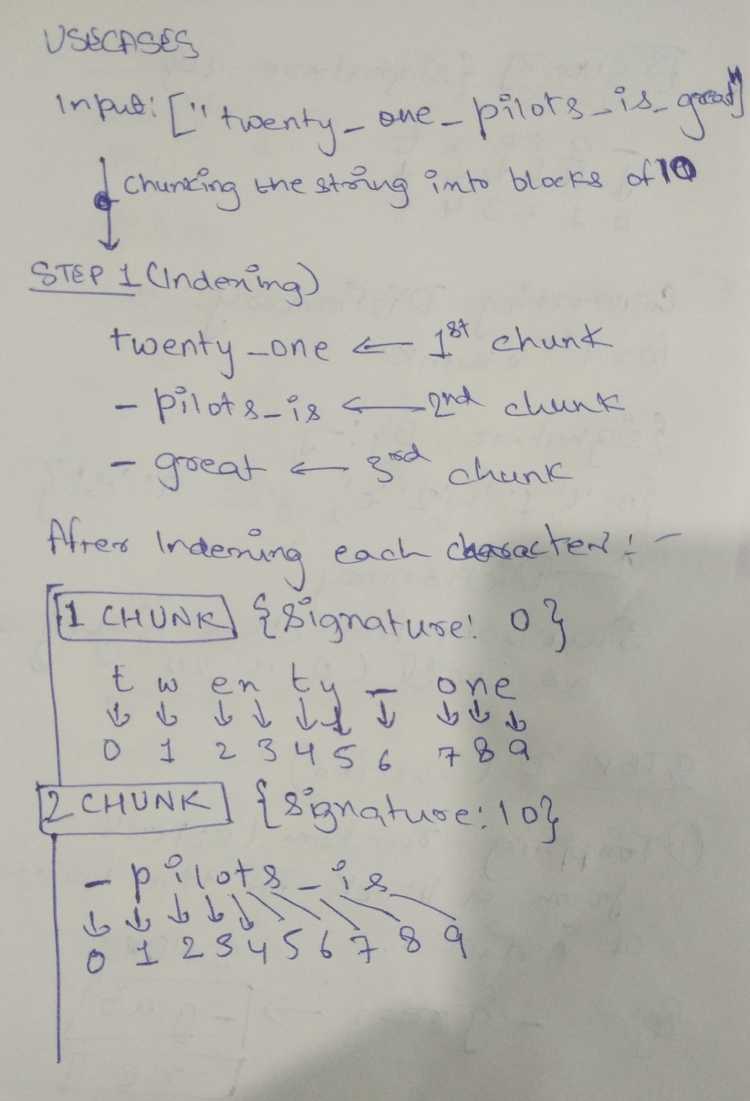
Twenty One pilots is greatHalocipher breaks the string into something called Blocks which have a maximum index of 10(starting form 0-9).
Note that I have replaced spaces(” ”) with an underscore(_) for the ease of this documentation since they are counted as characters as well.
Indexing of our example string would look something like:
-
1st Block; total characters: 10
Twenty_One-
2nd Block; total characters: 10
_Pilots_is-
3rd Block; total characters: 6
_greatFurther, each block is indexed into separate characters starting from 0 and ending at 9, like this:
T —> 0
w —> 1
e —> 2
n —> 3
t —> 4
y —> 5
_ —> 6
O —> 7
n —> 8
e —> 9
...
Signing
After indexing each character and dividing it into Blocks, we assign each block with a Signature to track them later when we need to decrypt them.
Halocipher assigns an integer as a Signature to each block. The integer’s default value is 0 and gets incremented by 10 each time a new block is formed.
Let’s take the following as an example:
Signature: 0
Twenty_One
0123456789
Signature: 10
_Pilots_is
0123456789Signature: 20
_great
012345...Chunking
After the initial indexing and signing are done, the Blocks are separated into two Chunks, namely an Encrypted Chunk and a Schema Chunk.
Each letter of the block retains their index, like the following example:-
Encrypted Chunk:-
Signature: 0

Tnt_Oe
034679
Schema Chunk:-
Signature: 0
weyn
2358How do you determine what letter goes to Encrypted/Schema chunk?
We don’t, the order is randomized so neither you nor do we know about which letter goes to what type of chunk.
Tokenizing
Alright, this is where things become messy and fun at the same time. We replace the indexes given to each chunk with special characters. Yes, you read it correct.
Each chunk, like this one for example…
Encrypted Chunk:-
Signature: 0

Tnt_Oe
034679
Schema Chunk:-
Signature: 0
weyn
2358…retains their indexes assigned to the letters and thus we replace the indexes with a predefined list of Tokens as we call them.
The default token list looks something like this:-
{0: ')', 1: '!', 2: '@', 3: '#', 4: '$', 5: '%', 6: '^', 7: '&', 8: '*', 9: '('}After converting the integer indexes into the special characters, our example chunks look something like this:-
Encrypted Chunk:-
Signature: 0

Tnt_Oe
)#$^&(
Schema Chunk:-
Signature: 0
weyn
2358
@#%*Encryption
Finally, we can now proceed to encrypt our message. The two chunks of each block are saved into two different files namely schema_id.halo and encrypted_id.halo.
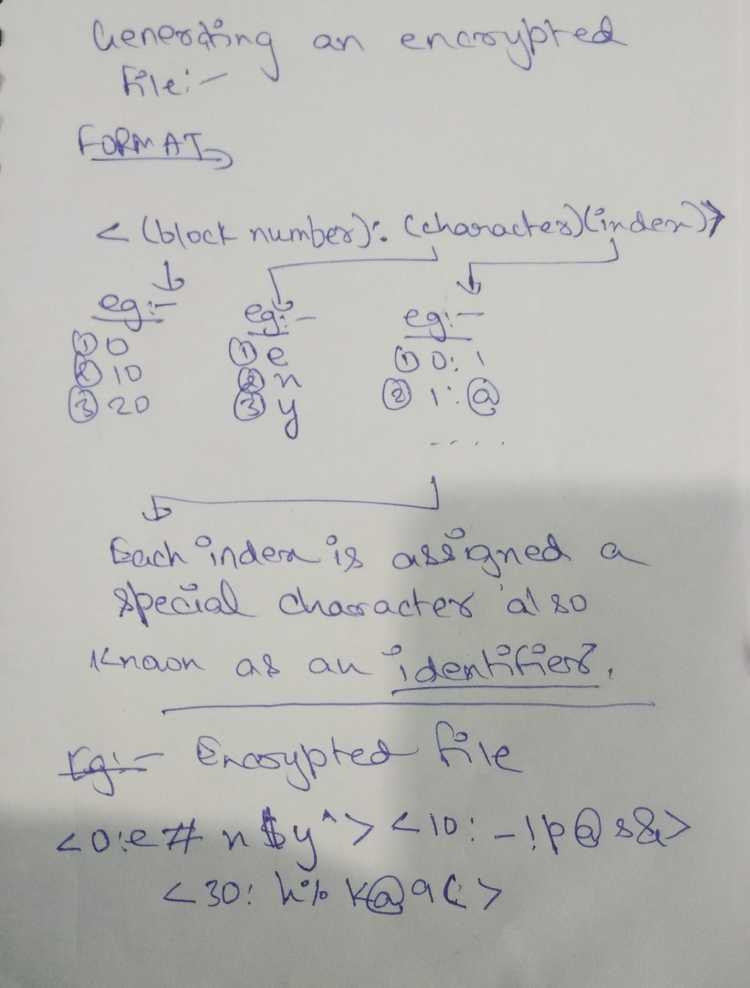
Each chunk is saved in the following format:-
<signature: (index character) (index character) .... (index character)>Our example encrypted chunk…
Encrypted Chunk:-
Signature: 0

Tnt_Oe
)#$^&(
should look like this:
<0:)T#n$t^ &O(e>Since space is counted as a character too, notice the space between ^ symbol and &.
Same goes with our schema chunk:-
<0:@w#e%y*n>Finally these encrypted chunks are saved in their respective encrypted and schema files.
A complete example of a encrypted.halo file looks like this:-
<0:)i#e$a*i(t%c!n& @ ><10:*w)e$i%o^n& ><20:><30:$c@e*a!h^a&r(c><40:)t!e$i&a^ %s><50:@c)u(n$u*o><60:!m&r(n#r$k@a><70:@ ^n!t#u><80:(s)h@ ^b*r#m><90:$t* &t%e@p(w^s><100:*n! #a$v( ><110:% @p#t&t(i$y^s)e><120:&h!g(c><130:&d$ ><140:><150:!t^h%c><160:^f!t*i><170:*p@s^t) %o# ><180:><190:(e!i$l& %l#a*w><200:><210:#c&n%e)h><220:(g%t@p!u# $s) &i*n>A complete example of the schema.halo file for the encrypted.halo file looks like this:-
<0:^h><10:(e!r#t@a><20:^ *f%k!c#e&i) @h$c( ><30:# %h)t><40:# * (p@r><50:!n^t#t&i%a><60:^o) * % ><70:* %i&g(t$s)o><80:$e!e%m&e><90:# )h!i><100:^ @h&a%e)e><110:*r!m><120:)n^w#t$o@ % *i><130:)h* %a^d(c! @w#e><140:$t^n(e#a&a!n%e*t)o@c><150:*r$ #e&a) @h(a><160:$ (t%i@e)c#r& ><170:!i(u$n& ><180:*n!c( ^i@t)n$a%t#u&o><190:@n^y)f><200:^a(t) !d* $p@i&y%l#s><210:(d$l^a*e!e@ ><220:^r>We can conclude that to decrypt the encrypted.halo file, it is required that you have the schema.halo file as well. It is also possible that sometimes we might change the default token list to something else. Whatever might happen, you’ll know what to do because (psst. i want u to win :) ).
Notes
I made some funky looking notes when we were working on the algorithm. I don’t know if they’ll help you or not, but I’m still attaching them incase they do.
Post 1
Post 2
Post 3

Decryption
This is the part you have to figure out and we can’t help with.. either you may reverse-engineer the whole algorithm or find out a more easy way to decrypt messages. It totally depends on your abilities and decisions.
Best of luck for the next series of levels.